All products featured are independently chosen by us. However, SoundGuys may receive a commission on orders placed through its retail links. See our ethics statement.


I tested the Bose QuietComfort Headphones (2nd Gen) and they’re a legit upgrade
Aug 22, 2026 — 5:00 AM ET
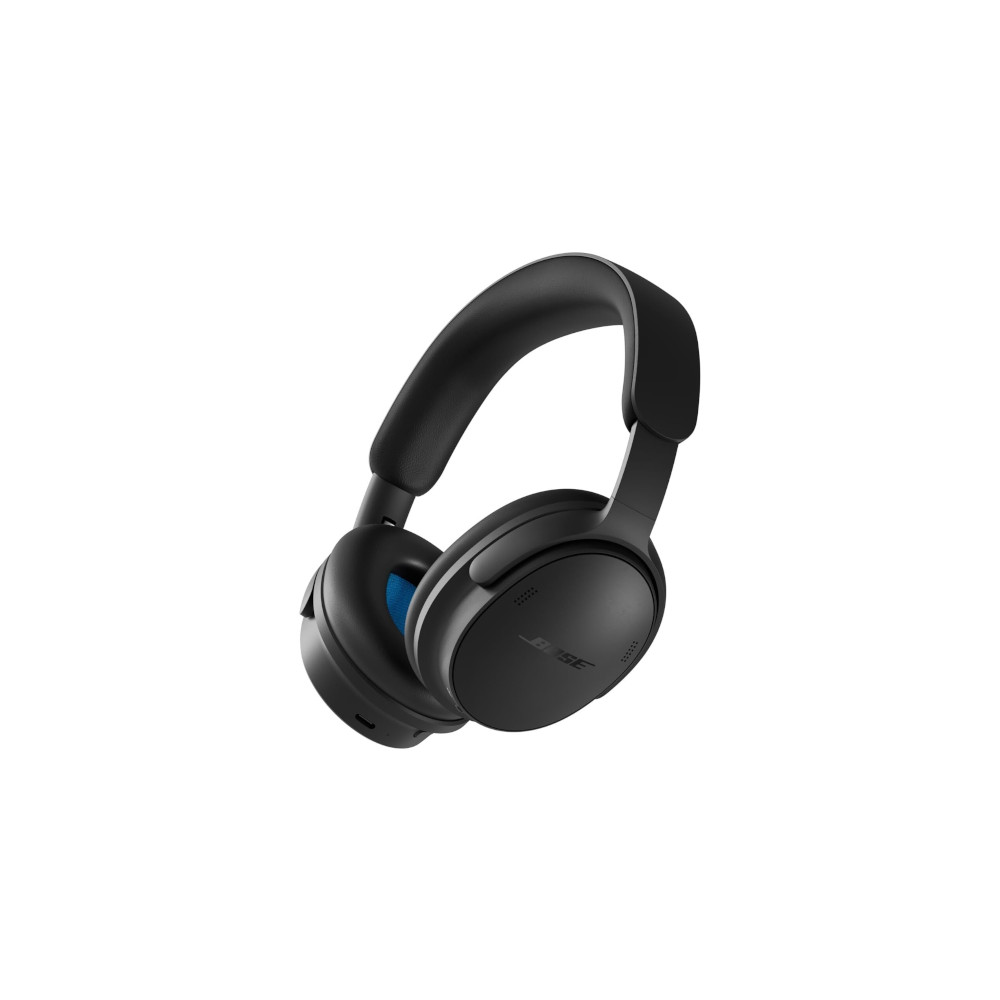
Bose QuietComfort Headphones (2nd Gen)


Premium ANC headphones keep getting more expensive, but you don’t necessarily need to jump straight to the top of the lineup. At $359, the Bose QuietComfort Headphones (2nd Gen) bring some of the best features from the flagship QuietComfort Ultras (2nd Gen) to a lighter, less expensive package.
So, should you skip the QC Ultras and save some money with the new QuietComfort Headphones (2nd Gen)? Let’s cue up some tunes and find out.
This article was published on TKTK, and this is the first version of the article. Updates will follow as the market changes.
What’s it like to use the Bose QuietComfort Headphones (2nd Gen)?
The Bose QuietComfort Headphones (2nd Gen) live up to their name, proving to be comfortable, good-sounding ANC headphones for commuters and travelers alike.
Design
At 230g, the Bose QuietComfort Headphones (2nd Gen) are seriously light, and that goes a long way during a lengthy commute or longer listening sessions. There’s plenty of padding around the earcups and across the headband, and I had no trouble getting a comfortable fit that stayed put while walking around the city. The tradeoff is that there’s a lot of plastic here. They don’t feel as premium as the QuietComfort Ultra Headphones (2nd Gen), but I’ll happily take some plastic creaks if it means less weight on my head for a few hours. Just keep them out of the rain, as there’s no IP rating.
The padded section now extends much farther down the headband toward the earcups, giving you more cushioning across your head.
Bose has also changed the headband adjustment this time around. The previous QuietComfort Headphones used metal adjustment arms with distinct notches, whereas the new headphones use smooth, plastic sliders. I prefer the old notched system for making quick, repeatable adjustments, but the new design has one big comfort advantage: way more headband padding. The padded section now extends much farther down the headband toward the earcups, giving you more cushioning across your head. Considering these are called the QuietComfort Headphones, I’ll take that tradeoff.
Thankfully, Bose hasn’t messed with one of my favorite parts of the QuietComfort design: the physical controls. You still get proper buttons for playback and volume instead of the touch-sensitive volume slider found on the QC Ultras, and I much prefer them. The power/Bluetooth switch has moved to the underside of the left earcup, while the listening mode/shortcut button remains easy to reach.
You still get proper buttons for playback and volume instead of the touch-sensitive volume slider found on the QC Ultras, and I much prefer them.
The headphones also fold up nicely and tuck into the included carrying case, making them easy to throw in a backpack or carry-on. Bose has ditched the dedicated 3.5mm jack, but the addition of USB-C audio more than makes up for it in my book. Better yet, Bose includes both USB-C to USB-C and USB-C to 3.5mm cables, so you’re covered whether you’re plugging into a laptop or the entertainment system on a plane. That’s something I’d like to see with every set of headphones that supports USB audio. Bonus points for the color-matched cables, too.
Features
As usual, the Bose app keeps things pretty simple. From the main screen, you can check battery life, change listening modes, access Immersive Audio, manage Bluetooth connections, and tweak a few other settings. You can also choose which listening modes you want to cycle through with the physical button on the headphones.
The EQ is still pretty basic. You get three controls for bass, mids, and treble, along with a few presets. That’s nowhere near as flexible as some competing apps, but I didn’t feel much need to mess with it this time around. I was perfectly happy leaving the QuietComfort Headphones (2nd Gen) at their default EQ for most of my listening.
One of the bigger additions is Immersive Audio, which has trickled down from the QC Ultra line.
One of the bigger additions is Immersive Audio, which has trickled down from the QC Ultra line. You can choose between Still and Motion modes, with Motion using head tracking as you move around. There’s also a Cinema mode aimed at movies and other spoken content. I’m glad Bose included these options, though I still spent most of my time listening in regular stereo.
You can also completely turn ANC off, which is surprisingly worth mentioning since the QC Ultras don’t give you that option. Bose doesn’t exactly make the setting easy to find, though. There’s no simple ANC-off toggle. Instead, you have to create a new Mode in the app, give it a preset-style name like Home, Music, Outdoor, or Relax, and then dial the noise control all the way down. Once you’ve done that, you can add the Mode as a favorite and access it with the physical button on the headphones. I like having the option, but Bose could definitely make getting there a little more straightforward.
How does the Bose QuietComfort Headphones (2nd Gen) connect?

The Bose QuietComfort Headphones (2nd Gen) use Bluetooth 5.4 and support multipoint, so you can stay connected to two devices at once. You’re limited to the SBC and AAC Bluetooth codecs, with no LDAC or aptX support. There’s no Auracast support at launch, either. Pairing was painless in my testing, and I didn’t run into any annoying dropouts or connection issues during everyday use.
The bigger upgrade is wired connectivity. Bose has finally added USB-C audio, addressing one of our complaints with the previous QuietComfort Headphones. The included color-matched USB-C to USB-C cable handles charging and audio at the same time, with lossless input up to 24-bit/48kHz and voice output up to 24-bit/16kHz.
Bose has ditched the dedicated 3.5mm jack, but I’m totally fine with that because you get a USB-C to 3.5mm cable in the box. You can still plug into an airplane entertainment system or any other analog source without having to buy anything extra. This is how every pair of headphones with USB-C audio should do it: give me both cables in the box, and I’m happy.
How long does the Bose QuietComfort Headphones (2nd Gen)’s battery last?
Bose advertises up to 24 hours of battery life with ANC enabled. That should get you through your commute for quite a while, but with some competing ANC headphones pushing well beyond 50 hours per charge, you’ll likely be plugging these headphones in more often than others. Our standardized battery testing is still ongoing, and we’ll update this review with our results as soon as testing is complete.
Additionally, a 15-minute quick charge gets you up to 2.5 hours of playback, which should get you out the door in a pinch.
How well do the Bose QuietComfort Headphones (2nd Gen) cancel noise?
Really well, assuming you get a good fit and seal. In our testing, the Bose QuietComfort Headphones (2nd Gen) achieve an average perceived loudness reduction of 71.9% from isolation alone, jumping to 85.1% with ANC turned on. That’s pretty darn close to the more expensive QuietComfort Ultra Headphones, which hit 87% in our testing.
I was equally impressed out in the real world. Walking around the city, the ANC did a great job knocking down the constant rumble of traffic and general background noise. The passive isolation is already pretty good, but flipping ANC on makes a very noticeable difference.
How good is the Bose QuietComfort Headphones (2nd Gen) Transparency mode?
Bose calls its transparency mode Aware Mode, and for the most part, it works well. You get a decent sense of what’s happening around you without taking the headphones off, and ActiveSense can automatically tone down sudden or particularly loud sounds.
That said, the passive isolation is still pretty good. If you’ve got your music cranked, don’t expect to hear every detail of what’s going on around you just because Aware Mode is enabled.

My biggest complaint is wind noise. Even just walking around the city, I found that Aware Mode picked up a distracting amount of wind. You can create a custom Mode in the Bose app and enable Wind Noise reduction, which does help, but that setting requires ANC to be turned on. So, if you actually want to hear your surroundings while walking around, wind noise can still be a problem.
How do the Bose QuietComfort Headphones (2nd Gen) sound?
The Bose QuietComfort Headphones (2nd Gen) sound great out of the box, and I never felt the need to reach for the EQ.
Reviewer’s notes
Editor’s note: this review uses a hover-enabled glossary to describe sound quality based on a consensus vocabulary. You can read about it here.
Objective Measurements
The Bose QuietComfort Headphones (2nd Gen) stay reasonably close to our headphone preference curve through most of the frequency range, with a little extra bass strength. Things get a bit more uneven in the treble, where we see a series of peaks and dips compared to our preference curve. It looks a little messy on the chart, but in practice, these are an enjoyable pair of headphones to listen to without going overboard on bass or treble strength.
Bass Boost EQ Preset
The Bass Boost preset does exactly what it says, adding a healthy amount of bass strength without significantly changing the treble response. If you want more bass, you can crank it up without messing with the rest of the tuning too much.
Treble Boost EQ Preset
The Treble Boost preset is a bit more aggressive, increasing treble strength and making those existing peaks more pronounced, particularly around 4kHz, 9kHz, and 14kHz. The bass and midrange remain largely unchanged, so this is very much a treble-focused adjustment.
Yes. Turning ANC off noticeably changes the frequency response of the Bose QuietComfort Headphones (2nd Gen). Bass strength increases substantially, while the midrange drops further between roughly 200Hz and 600Hz. The treble also shifts in a few places, though the differences there are smaller. If you like how these headphones sound with ANC on, don’t expect quite the same tuning when you switch it off.
How would most people rate the sound from 1 to 5?
The chart below shows the Multi-Dimensional Audio Quality Scores (MDAQS) earned by the Bose QuietComfort Headphones (2nd Gen). The algorithm uses a mountain of data from real people to predict how a group of 200 or so humans would rate the sound of a product on a scale from 1.0 (very bad) to 5.0 (very good), and return a mean opinion score.
Hold up! Something’s missing: We’re still waiting on the MDAQS results for the Bose QuietComfort Headphones (2nd Gen). We’ll update this review with the scores as soon as testing is complete.
- Timbre (MOS-T) represents how faithfully the headphones reproduce the frequency spectrum and temporal resolution (timing information).
- Distortion (MOS-D) represents non-linearities and added noise: higher scores mean cleaner reproduction.
- Immersiveness (MOS-I) represents perceived source width and positioning: how well virtual sound sources are defined in three-dimensional space.
Can you use the Bose QuietComfort Headphones (2nd Gen) for phone calls?
Yep, the Bose QuietComfort Headphones (2nd Gen) can handle phone calls, with six microphones taking care of voice pickup and noise control. Bose says background noise filtering is better this time around, but rather than take its word for it, have a listen to our microphone samples below.
I’m also a big fan of the new two-way USB-C audio support. Plug the headphones into your computer over USB-C, and you can use the microphones for calls at up to 24-bit/16kHz while listening over the same cable. If you’re on video calls all day, that’s a genuinely useful upgrade.
Bose QuietComfort Headphones (2nd Gen) microphone demo (Ideal conditions):
How does the microphone sound to you?
Bose QuietComfort Headphones (2nd Gen) microphone demo (Office conditions):
Bose QuietComfort Headphones (2nd Gen) microphone demo (Street conditions):
Bose QuietComfort Headphones (2nd Gen) microphone demo (Windy conditions):
Bose QuietComfort Headphones (2nd Gen) microphone demo (Reverberant space):
In ideal conditions, the microphone sounds perfectly fine, keeping voices clear and easy to understand. It doesn’t reject a ton of background chatter in our office test, but voices remain clear through the noise. Wind is a different story, though. The microphones struggle quite a bit once the wind picks up, so I wouldn’t plan on having any long walk-and-talk conversations with these headphones.
Should you buy the Bose QuietComfort Headphones (2nd Gen)?

Yes, especially if comfort and ANC are your priorities. The Bose QuietComfort Headphones (2nd Gen) are lightweight, comfortable enough to wear for hours, and deliver excellent ANC without forcing you to spend even more on the QC Ultras. USB-C audio is another welcome addition that makes these a much more complete pair of headphones than the previous generation.
If you’re looking for alternatives to the Bose QuietComfort Headphones (2nd Gen), consider the Sony WH-1000XM6 ($448 at Amazon) for another top-tier ANC option, or step up to the Bose QuietComfort Ultra Headphones (2nd Gen) ($449 at Amazon) if you prefer their more premium-looking design and touch controls. That said, I’d seriously consider saving the money and sticking with the regular QuietComfort Headphones (2nd Gen).
For even more options, be sure to check out our list of the best ANC headphones.
Thank you for being part of our community. Read our Comment Policy before posting.