All products featured are independently chosen by us. However, SoundGuys may receive a commission on orders placed through its retail links. See our ethics statement.


Creative Aurvana Ace 3 review: Amazing sound for a mid-tier price
Dec 2, 2025 — 1:10 PM ET
Creative Aurvana Ace 3
Ear-tip sizes: S, SS, M, L, XL


The Creative Aurvana Ace 2 have been a favorite of ours here in the SoundGuys office, with great sound quality thanks to their xMEMS drivers. Creative then expanded the lineup with the Aurvana Ace Mimi, which added personalized sound tuning through Mimi Hearing. Now, Creative is combining the best of both worlds with the Aurvana Ace 3, while adding new features like smart wear detection for automatic play/pause and support for LDAC. The Ace 3 is here, aiming to deliver premium audio performance at a mid-range price. Does Creative’s most feature-complete model yet justify its place in an increasingly crowded market?
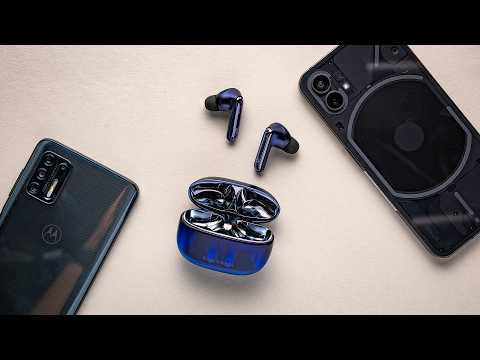
The Creative Aurvana Ace 3 are for listeners who prioritize sound quality above all else. The combination of xMEMS drivers, aptX Lossless and LDAC codec support, and Mimi sound personalization makes them ideal for audiophiles who don’t want to spend flagship prices.
- This article was updated on December 2, 2025, to add Multi-Dimensional Audio Quality Scores and embed our video review.
- This article was published on November 18, 2025, and this is the first version of the article. Updates will follow as the market changes.
What’s it like to use the Creative Aurvana Ace 3?

Using the Creative Aurvana Ace 3 feels very familiar to the Aurvana Ace 2 or Ace Mimi. The design remains virtually unchanged; the case is the same shape and size, with a lanyard loop on the side. However, instead of the black and copper colors of the Ace 2, the Ace 3 comes in a semi-translucent purple and silver. The hinge for the case lid is a bit loose, and I can foresee it worsening over time, as it has with our pair of Ace 2 earbuds in the office. Still, the plastic construction feels durable enough, and the earbuds carry an IPX5 water-resistance rating, meaning they can handle sweat and splashes of water in the rain.
I found the earbuds lightweight and comfortable to wear for up to a couple of hours. The stem design helps achieve a secure fit, and with five sizes of silicone ear tips included in the box (XS, S, M, L, XL), I had no trouble finding a comfortable seal. The smaller ear tips are narrower and longer to fit deeper into the ear canal, while the larger ear tips are shorter and wider. The overall shape, fit, and weight are similar to the Apple AirPods Pro. The earbuds also include a cloth pouch carrying case to protect them from scratches during travel, as well as a charging cable.
You can control the Creative Aurvana Ace 3 by tapping on the outside of either earbud. Below, we’ve outlined the default controls; however, you can customize each function within the Creative app.
| Input | Left earbud | Right earbud |
|---|---|---|
| Input Double tap | Left earbud Ambient control | Right earbud Play/pause |
| Input Triple tap | Left earbud Voice assistant | Right earbud Next track |
| Input Long tap | Left earbud Volume down | Right earbud Volume up |
Curiously, there is no assignable command for single taps. I’m not sure why Creative hasn’t implemented them, as single taps tend to be universal among wireless earbuds for playing and pausing music.
What are the best features of the Creative Aurvana Ace 3?
The headline feature of the Ace 3 is the combination of xMEMS dual-driver technology with Mimi sound personalization. The xMEMS drivers help deliver clarity and detail, particularly in the high frequencies, while the Mimi feature creates a custom hearing profile tailored to your ears. This can help you hear parts of music you didn’t even realize you were missing if you have mild to moderate hearing loss.
As for sound equalization, there are plenty of options. You can choose from 15 EQ presets, including profiles designed for specific music genres or gaming use cases like enhancing footsteps. Experienced listeners will appreciate the 10-band custom equalizer, which gives you precise control over the frequency response with ±9dB of emphasis. You can also use the personalized sound profile and a custom EQ simultaneously—our recommendation is to start with the Mimi personalization as a baseline, then fine-tune using the custom equalizer to match your preferences.
The app also provides access to ambient control settings, letting you switch between active noise canceling and ambient mode, with adjustable intensity levels for each. For gamers, there’s a low-latency Bluetooth mode buried in the settings that reduces audio delay at the expense of some audio quality. The app includes a handy scanner on the homepage to find nearby Auracast broadcasts.
One welcome addition to the Ace 3 is smart wear detection. Unlike the Ace 2 and Ace Mimi, these earbuds will automatically pause your music when you remove them from your ears and resume playback when you put them back in. It’s a feature most premium earbuds have had for years, and it’s nice to see Creative finally include it. However, I did have some issues with the Wear Detect sensors. When trying to access the ambient mode controls, the app would instruct me to place both earbuds in my ears, even though they were already in place.
I also experienced some connection issues with the app on Android. Every time I opened the app while listening to music, the earbuds would automatically announce they were scanning for broadcasts. Connecting to the app before taking the earbuds out of the case seemed to resolve both issues, but it was somewhat annoying when I wanted to listen to music quickly on the go.
How does the Creative Aurvana Ace 3 connect?

The Creative Aurvana Ace 3 comes with Bluetooth 5.4 and an impressive codec lineup that should satisfy just about any Android or iOS user. With Snapdragon Sound certification, the earbuds support aptX Lossless for CD-quality wireless playback on compatible devices. Android users also get LDAC support, giving you two pathways to high-resolution audio depending on your source device.
Rounding out the codec support are aptX Adaptive, LC3, AAC, and SBC. The aptX Adaptive codec is particularly useful, as it dynamically adjusts between quality and stability depending on your environment, while also providing low-latency performance for video and gaming. LC3 support future-proofs the earbuds for Bluetooth LE Audio devices and Auracast, which lets you tune into public audio broadcasts. Lastly, Bluetooth multipoint is onboard, allowing you to pair the earbuds with two devices simultaneously.
When you first open the charging case with a new set of Creative Aurvana Ace 3 earbuds, they will automatically enter pairing mode.
To manually pair the earbuds to a new device, follow these steps:
- Place the earbuds inside the charging case and open the lid.
- Press and hold the button on the bottom of the charging case for 3 seconds.
- The LED lights will now blink red and blue, indicating that you are in pairing mode.
- You can now go into Bluetooth settings on your phone and select the Aurvana Ace 3.
How long do the Creative Aurvana Ace 3’s battery last?
The Creative Aurvana Ace 3 lasted 6 hours and 9 minutes on a single charge in our testing. This falls just short of the seven hours Creative claims, but it is still respectable for earbuds at this price point. The charging case provides an additional three full charges, for a total battery life of around 26 hours. That means you’ll only need to remember to charge them about once a week with regular use.
From empty, 10 minutes of fast charging will provide 60 minutes of listening time on the Aurvana Ace 3. This isn’t as fast as some competing wireless earbuds, but with over 24 hours of total battery life with the case, you shouldn’t find yourself scrambling for a quick top-up very often.
How well do the Creative Aurvana Ace 3 cancel noise?
Loading chart ...
While these aren’t among the best noise canceling earbuds, the Auravana Ace 3 still does a decent job of blocking out environmental noise as long as you get a good seal from the ear tips. The total noise attenuation is nearly identical to that of the previous Ace 2 earbuds, reducing the loudness of outside noise by an average of 75%.
You only have the option to use Adaptive ANC, which means the earbuds will adjust the level of noise canceling based on the environmental noise level. Personally, I prefer to be able to set the ANC strength to high and leave it there for all situations, but you can’t do that here. Still, as you can see in the chart above, the Creative Aurvana Ace 3 provides 30dB of ANC attenuation at 100 Hz and 1kHz, and 40dB of attenuation at 2.5kHz with ANC on. Most low-frequency noise will sound about 1/4 to 1/8 as loud when ANC is enabled. The ANC is particularly effective in the mid-range around 2.5kHz, which helps reduce the sound of people talking around you.
As for the Ambient Mode, I did not find it very good. Environmental sounds often appear unnatural, muffled, and processed, with a constant background of static noise. If a quality transparency mode matters to you, you should look elsewhere.
How do the Creative Aurvana Ace 3 sound?
The Creative Aurvana Ace 3 sounds excellent, with the hybrid xMEMS and dynamic drivers delivering impressive clarity and detail across the frequency range.
Reviewer’s notes

Editor’s note: this review uses a hover-enabled glossary to describe sound quality based on a consensus vocabulary. You can read about it here.
Can you use the Creative Aurvana Ace 3 for phone calls?
With three omnidirectional MEMS microphones on each earbud, the Creative Aurvana Ace 3 can take calls on the go. Audio quality isn’t exceptional, even in ideal conditions, but it is perfectly serviceable for the person on the other end of the line to understand what you are saying. Background noise rejection isn’t great either, but it never overpowers the speaker. Take a listen to our microphone demos below, and let us know what you think in our poll.
Creative Aurvana Ace 3 microphone demo (Ideal conditions):
How does the microphone sound to you?
Creative Aurvana Ace 3 microphone demo (Office conditions):
Creative Aurvana Ace 3 microphone demo (Street conditions):
Creative Aurvana Ace 3 microphone demo (Windy conditions):
Creative Aurvana Ace 3 microphone demo (Reverberant space):
During our lab testing and my own usage, we found that if one earbud was removed while on a call, or if the wear detect sensor failed, the microphones would immediately turn off, which was fairly annoying. As such, I recommend you ensure you have a proper fit and don’t fiddle with the earbuds while on call.
Should you buy the Creative Aurvana Ace 3?

With cutting-edge driver technology, comprehensive codec support, and personalized sound tuning, you might expect the Creative Aurvana Ace 3 to cost significantly more than $150. At this price, they represent excellent value—about half the cost of most flagship wireless earbuds. That said, many flagship models will provide better ANC performance, transparency modes, and more polished companion apps.
If you prioritize sound quality above all else and want earbuds that can adapt to your hearing, the Creative Aurvana Ace 3 are an easy recommendation.
Would you buy the Creative Aurvana Ace 3?
Creative Aurvana Ace 3 review: FAQs
Yes, the Creative Aurvana Ace 3 charging case supports wireless. We recommend a Qi‑compatible wireless charging pad of at least 5W for optimum charging speed.
Yes, the Creative Aurvana Ace 3 supports mono mode, allowing you to use either earbud independently for music listening. However, note that if you remove one earbud during a phone call, the microphones will turn off, so you'll need to keep both earbuds in for calls.
Yes, you can access Siri on the Creative Aurvana Ace 3 by triple-tapping the left earbud to activate your voice assistant.
Yes, the Creative Aurvana Ace 3 support lossless audio via aptX Lossless on compatible Snapdragon Sound devices with lossless source files.
Yes, the Creative Aurvana Ace 3 are good for running and working out. Their IPX5 rating provides sweat and splash resistance, and the lightweight design with multiple ear tip sizes helps ensure a secure fit during exercise.
Thank you for being part of our community. Read our Comment Policy before posting.