All products featured are independently chosen by us. However, SoundGuys may receive a commission on orders placed through its retail links. See our ethics statement.
Cleer ARC 5 review: Feature-packed, but on the heavy side

Nov 20, 2026 — 4:56 PM ET

The Cleer ARC 5 combine open-ear listening with a touchscreen case, THX Spatial Audio, and Dolby Atmos optimization. They're great for desk use and casual listening, with plenty of customization options. However, their weight and fit make them less ideal for workouts or listening on the go.
What we like
What we don't like


The Cleer ARC 5 are premium open-ear earbuds that take on the likes of Bose and Shokz with some interesting features, including THX Spatial Audio with head tracking, Dolby Atmos optimization, and a touchscreen charging case. At $219.99, they’re aimed at listeners who want to enjoy their music while staying aware of their surroundings, whether that’s during a workout, on a walk, or around the office. But do the ARC 5 offer enough to stand out in the growing open-ear market? Let’s find out.
What’s it like to use the Cleer ARC 5?
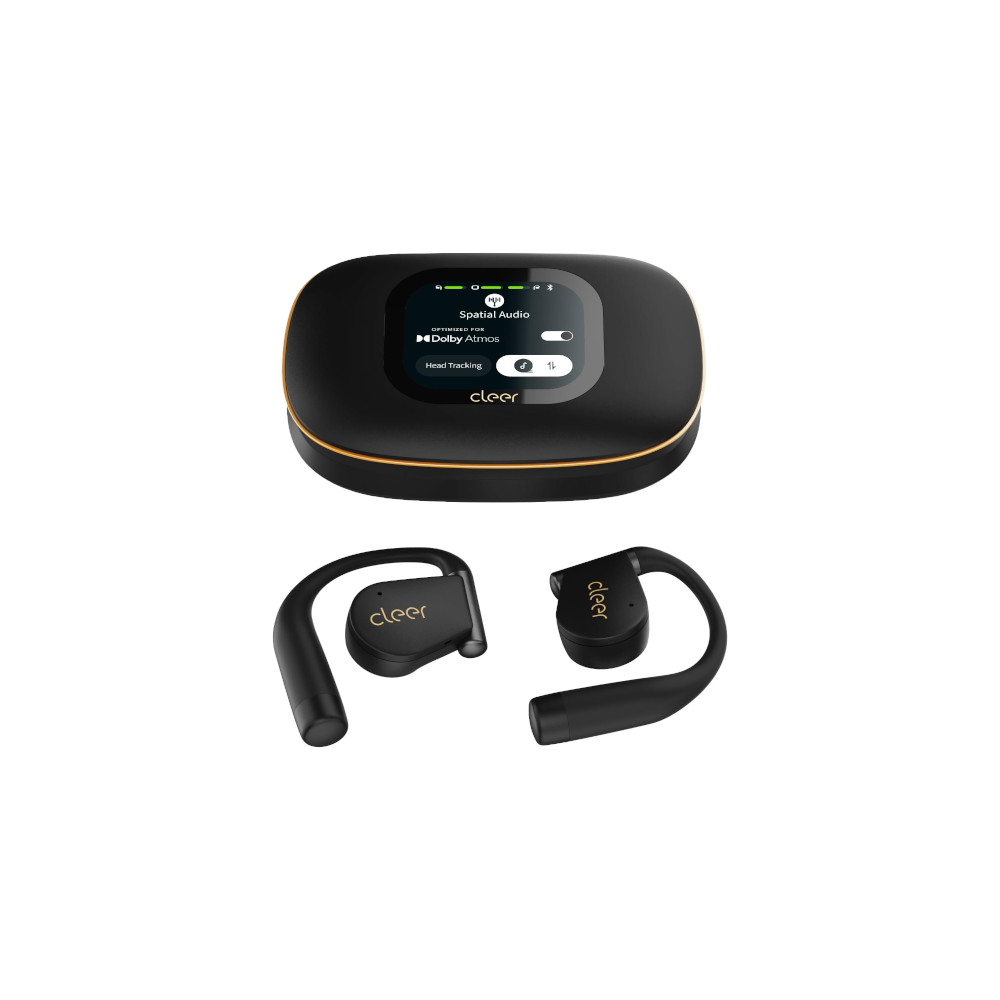
The Cleer ARC 5 have an open-ear design that keeps you aware of your surroundings, plus a touchscreen charging case that lets you control playback and adjust settings without reaching for your phone.
Design
The Cleer ARC 5 use an over-ear hook design rather than the clip-on style we’ve seen on some competing open-ear earbuds. The hooks wrap around the top to the back of your ears to keep the earbuds in place, but this design isn’t ideal for glasses wearers, since the hooks compete for the same space as your glasses. At 11.5g per earbud, they’re also on the heavier side. For comparison, Apple’s AirPods Pro 3 weigh just 5.55g each, making the ARC 5 more than twice as heavy. Of course, the open-ear design means there’s no pressure inside your ear canals.
Another thing to consider is how the drivers line up with your ear canals. Everyone’s ears are shaped differently, and unlike traditional in-ear earbuds, there’s no guarantee the ARC 5 drivers will sit in the ideal position. Depending on your ears, the drivers might end up slightly above, below, or away from your ear canals, which can affect the sound you hear.
The heavier driver housings would swing outward before dropping back down against my ears.
In my experience, the fit wasn’t particularly secure. The driver housings are the heaviest part of the earbuds, and when I shook my head or leaned to either side, the ear hooks acted almost like hinges. The driver housings would swing outward before dropping back against my ears. As a result, the drivers weren’t consistently aligned with my ear canals, causing noticeable changes in sound quality as I moved. While the earbuds have an IPX7 water-resistance rating, this movement makes them less than ideal for running.

For controls, you can tap the earbuds to manage playback without reaching for your phone. However, one of the more interesting features is the AMOLED touchscreen built into the charging case. You can use it to skip tracks, check battery levels, switch EQ presets, and adjust various settings.
One small annoyance I noticed is how the earbuds sit inside the case. The right earbud goes into the left side, while the left earbud goes into the right. It’s the opposite of how you wear them, which takes some getting used to. It’s not a major issue, but it feels unnecessarily backwards for something you’ll be doing every day.
Features
The Cleer ARC 5 come with plenty of features, most of which you can manage through the Cleer+ app. You get THX Spatial Audio with head tracking, Dolby Atmos optimization, and dedicated Music and Movie modes. These options might appeal to anyone who enjoys spatial audio when listening to music or watching movies on their phone or tablet.
The app also offers several EQ presets, including Flat, Rock, Jazz, Classical, Pop, and Sport, alongside a custom EQ for adjusting the sound to your liking. You can customize the tap controls on each earbud, manage motion controls, and access voice control settings. There’s also an AVC Technology setting, along with Hearing Care, sedentary reminders, and neck health features.
You get THX Spatial Audio with head tracking, Dolby Atmos optimization, and dedicated Music and Movie modes.
Cleer includes some AI tools, too, including real-time translation, voice memos, and a companion feature. These could be useful for travelers or anyone interested in using their earbuds for more than music. As mentioned earlier, the AMOLED touchscreen charging case also gives you access to playback controls, battery levels, EQ settings, and other functions without opening the app on your phone.
How does the Cleer ARC 5 connect?

The Cleer ARC 5 earbuds use Bluetooth 5.4 and support SBC, AAC, LDAC, LC3, aptX Adaptive, and aptX Lossless codecs. The earbuds also support Bluetooth multipoint, allowing you to connect to two devices simultaneously, such as a phone and laptop, without manually disconnecting and reconnecting each time.
How long does the Cleer ARC 5 battery last?
According to Cleer, the ARC 5 earbuds last up to 12 hours on a single charge, with the charging case providing another 48 hours for a total of 60 hours of playback. They also support quick charging, with Cleer claiming that just 10 minutes of charging gets you up to four hours of playback.
How well do the Cleer ARC 5 block out noise?
The Cleer ARC 5 don’t have active noise cancelation (ANC), and since they’re open-ear earbuds, they don’t offer much isolation either. But that’s kind of the whole point. They’re designed to let you hear what’s going on around you while you listen to music. That can be great for walking around town, or keeping an ear out for someone calling your name. On the flip side, you’ll have to compete with background noise in louder environments, so these aren’t the earbuds I’d reach for on a noisy commute.
How do the Cleer ARC 5 sound?
The Cleer ARC 5 deliver decent sound for open-ear earbuds, although bass depth and driver positioning are noticeable limitations.
Reviewer’s notes
Editor’s note: this review uses a hover-enabled glossary to describe sound quality based on a consensus vocabulary. You can read about it here.
Can you use the Cleer ARC 5 for phone calls?
The Cleer ARC 5 use a dual-microphone system with Qualcomm cVc noise reduction to help keep your voice clear during calls. As you can hear in our microphone samples below, voice quality is great in ideal conditions and decent in an office environment. However, the microphones struggle to reject wind noise and reverberation, so calls may be harder to understand in those situations.
Cleer ARC 5 microphone demo (Ideal conditions):
How does the microphone sound to you?
Cleer ARC 5 microphone demo (Office conditions):
Cleer ARC 5 microphone demo (Street conditions):
Cleer ARC 5 microphone demo (Windy conditions):
Cleer ARC 5 microphone demo (Reverberant space):
Should you buy the Cleer ARC 5?

The Cleer ARC 5 are worth considering if you want open-ear earbuds for listening to music or watching movies while staying aware of your surroundings. Their touchscreen charging case, customizable EQ, and spatial audio features offer plenty to experiment with, particularly if you spend most of your listening time at a desk.
However, the fit is a notable drawback. During my testing, the driver housings swung outward when I moved my head, changing their position relative to my ear canals and affecting the sound. The over-ear hooks also compete for space with glasses, and the relatively heavy design makes the ARC 5 less appealing for workouts.
At $219.99, I’d recommend the Cleer ARC 5 primarily to listeners who value their extra features and plan to use them while sitting or moving around the house. If you need earbuds that stay securely positioned during exercise, I’d look elsewhere.
Would you buy the Cleer ARC 5 earbuds?
Otherwise, if you’re looking for other open-ear alternatives to the Cleer ARC 5, perhaps with workouts in mind, consider the Nothing Ear (open) or the Anker AeroFit 2. For another affordable option with a different design, you can also check out the clip-on style CMF Clip.
Conversation
Read what readers said or add your take.