All products featured are independently chosen by us. However, SoundGuys may receive a commission on orders placed through its retail links. See our ethics statement.
After a week with the Samsung Galaxy Buds On, I'm a believer

Nov 24, 2026 — 5:00 AM ET

The Samsung Galaxy Buds On are open earbuds that are far more mature than some of their competitors, offering unique ease-of-use features that will eventually be emulated elsewhere.
What we like
What we don't like


Open earbuds have some pretty significant tradeoffs, but they’re becoming more and more popular despite it all. Samsung has finally joined the fray with their own clip-style open earbuds, but do they make the grade? At $229.99, the Samsung Galaxy Buds On certainly has a lot to prove.
This article was published on November 24, 2026, and this is the first version of the article. Updates will follow as the market changes.
What’s it like to use the Samsung Galaxy Buds On?
Samsung made open earbuds that you really don’t have to think much about, and I’m a big fan of that.
Design

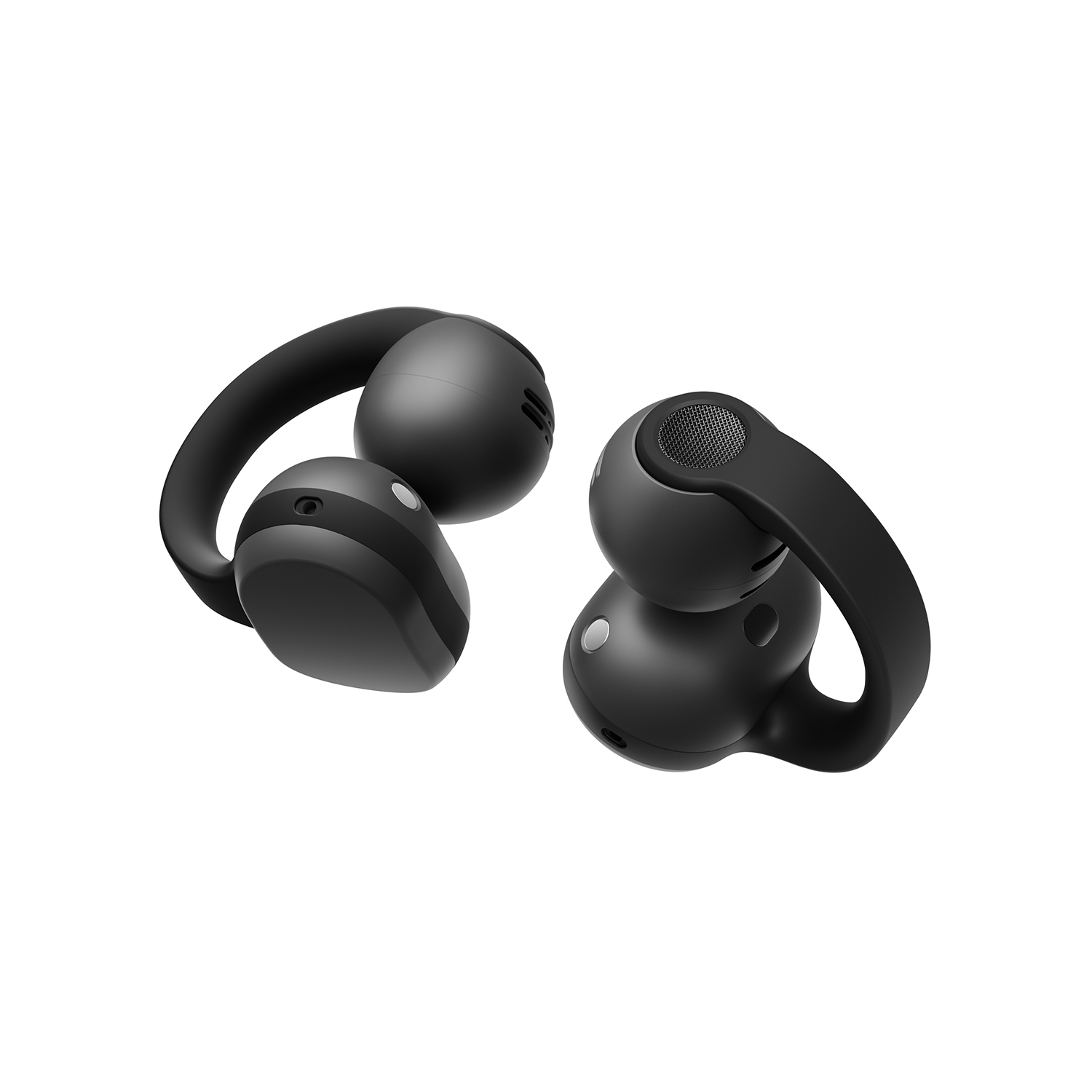
The Samsung Galaxy Buds On is a set of matte plastic open earbuds, using the tried-and-true cuff-and-bulb design that fits by hugging your ear from the front and back. The front housing contains a speaker that fires sound right at your ear canal, as it sits in your concha.
Though I find most clip-style open earbuds to be a little uncomfortable, Samsung did a good job with making their first clip-on buds as thought-free to use as possible. They’re comfortable enough that you can often forget you’re wearing them, and because the Samsung Galaxy Buds On senses which side should be which when you put them in your ears: you can’t put them in wrong. Not having to worry about putting them in your ears or charging case the incorrectly removes very common pain points of this style of earbud. You can also listen to one at a time if you want, and it doesn’t matter which side you keep in: your phone won’t stutter or drop the connection.
Samsung did a good job with making their first clip-on buds as thought-free to use as possible.
Similarly, you don’t have worry about outside dust or moisture causing problems for the earbuds, as they’re IP54 rated. Just don’t take them into the shower and you’ll be fine. Though these should work for the gym, just be aware that IP54 isn’t a waterproof rating, so avoid the pool if you’re wearing the Samsung Galaxy Buds On.
The charging case is quite small, and the lid is a semi-transparent plastic that attracts fingerprints like nobody’s business. However, it can easily fit into pockets without “bulking out” of them. It may not be possible to cram these in skinny jeans, but that’s really the only kind of pocket I’m worried about being unable to fit the case.
Features
To continue the theme of being earbuds you don’t have to think about, Samsung made the Galaxy Buds On able to interface with its phone operating system’s AI features by default, allowing you to transcribe calls, leave memos, translate conversations — the works. However, none of these features work if you don’t have a newer Samsung phone.
Beyond these features, the Samsung Galaxy Buds On come loaded with the usual top-of-the-line features that earbuds seem to come with nowadays, including a feature to locate your earbuds, control customization, a 10-band EQ with presets, and a few other goodies in Samsung’s app.

Controls are basic, but enough to handle most peoples’ needs. All you have to do is touch the flat part of the bulb that sits behind your ear. For example, a single tap will play or pause your music, a double tap will track forward, a slight long press will increase or decrease volume depending on which side you touch. Holding your finger down for longer will enable Bixby or Gemini Live to allow you to talk to your AI assistant — assuming you do that.
How does the Samsung Galaxy Buds On connect?
The Samsung Galaxy Buds On connects to sources via Bluetooth 6.2, with a stable of codecs including SBC, AAC, Samsung Seamless Codec Ultra High Quality (SSC-UHQ), and Samsung Seamless Codec (SSC) — not to be confused with Samsung Scalable Codec, also an “SSC.”
Though the earbuds use the Qualcomm Snapdragon S7 Gen 1, it’s unclear if the earbuds will ever support Snapdragon Sound, given Samsung’s phones don’t always support it. However, if you’re using a newer Samsung phone: you’ll have the support of the best codecs Samsung has available. For users of just about any phone, the earbuds support Fast pair/Swift pair, so you should be able to merely open the case and have the earbuds find your phone instead of going through a manual pair process.
If I had to take a shot at these buds, it’s that I really don’t appreciate the lack of true Multipoint on a product that really should support it. When swapping between devices, I had to manually reconnect if it wasn’t a Samsung device, and that it was very frustrating to lab test a product I couldn’t control from a phone. In your life, you might be annoyed switching from your computer to phone, and back again if you have to open the Bluetooth menu each time. Samsung hardware owners won’t have to worry about this, but not everyone does.
How long does the Samsung Galaxy Buds On’s battery last?

Though our unit hasn’t finished its battery test just yet, if the manufacturer claim of 9.5 hours of playtime is even remotely accurate: we should have a final figure for you later this morning. Just be aware that your milage may vary depending on what features you use, how loudly you listen, and how much you talk on the phone with them.
The case can be charged via wireless charging pad or by USB-C, though the wired charging option will always be faster than the wireless one. Given that the case has such a small battery (550mAh), it shouldn’t take too long to juice up even if you don’t have a charging brick that supports quick charge. Each earbud only has a 61mAh cell inside, so even a short stint in the case should be enough to get a couple hours of listening time if you’re in a pinch.
How well do the Samsung Galaxy Buds On block out noise?
Well… They don’t.
They’re open earbuds — they intentionally don’t block noise! So if the above chart looks a little devoid of information, that’s because it is. Sure, if the speaker housing blocks your ear canal any, there will be a little high-end noise blocked, but not enough to make a difference.
How do the Samsung Galaxy Buds On sound?
Editor’s note: this review uses a hover-enabled glossary to describe sound quality based on a consensus vocabulary. You can read about it here.
Can you use the Samsung Galaxy Buds On for phone calls?
What set of wireless earbuds would be complete without a mic array? The Samsung Galaxy Buds On’s microphones allow you to talk to your folks, your friends, and hopefully lesser frequency: your foes. Though the quality of the sound will be bottlenecked by your network and client, you can use the below as a sort of benchmark of how they’d sound when being used in a handful of environments. Just be aware that these samples were not recorded with the Ultra-Wideband mic setting, as there’s no reliable way to capture that audio outside of an actual phone call with a Samsung phone on a supported call.
The microphones also make use of what’s called a voice pickup unit (VPU) which is a small bone-conduction microphone. Just be aware that the performance of this can be impacted by fit. I’m relatively sure that the fixture we invented to handle this was able to make good contact with this component, but just know that your results may vary.
Samsung Galaxy Buds On microphone demo (Ideal conditions):
How does the microphone sound to you?
Samsung Galaxy Buds On microphone demo (Office conditions):
Samsung Galaxy Buds On microphone demo (Street conditions):
Samsung Galaxy Buds On microphone demo (Windy conditions):
Samsung Galaxy Buds On microphone demo (Reverberant space):
Overall, it’s hard to find too much fault with what are extremely tiny microphones. There’s an upper limit to what you can get out of wireless products, and the Samsung Galaxy Buds On’s clever use of a VPU seems to have sidestepped some common sources of noise issues. I mean, outside of echoes, anyway.
Should you buy the Samsung Galaxy Buds On?

I’m usually loathe to recommend open earbuds, but hell, I get these. If you’re someone who really doesn’t like the sensation of having your ear canal blocked by earbuds, or maybe you just never have a need for noise canceling: The Samsung Galaxy Buds On is a rock solid buy for Samsung phone owners, and for $229.99 it had damn well better be. I’m impressed by just how much design effort went into these, and it shows by how little you have to think about using them. I don’t like open earbuds — I like the Samsung Galaxy Buds On.
Thing is, though, that if you’re not deep into the Samsung ecosystem, these earbuds lose some of their secret sauce. For example, the AI features they’re advertised with, or the high-bitrate codec support, or seamless switching. Though it sucks to have to point that out, your phone might decide your purchase for you.
Conversation
Read what readers said or add your take.