All products featured are independently chosen by us. However, SoundGuys may receive a commission on orders placed through its retail links. See our ethics statement.
Nothing's new $99 earbuds come with a feature most flagships don't
Jul 17, 2026 — 5:00 AM ET


Measured in our lab
See all lab data →All lab data →The bottom line
The Nothing Ear 3a are competent earbuds, though the stock tuning requires a heavy hand to bring more in line with typical preferences. Luckily, there's very little about the earbuds that can be viewed as a shortcoming — which is extremely notable at $99.
What we like
What we don't like
Our assessment
Editor-scored from hands-on use, not measured- Isolation / Attenuation
- 6.2
- Durability / Build Quality
- 8.0
- Design
- 7.0
- Connectivity
- 9.0
- Portability
- 9.0
- Comfort
- 8.5
- Features
- 9.5
- Value
- 8.0
- Product release date
- July 7, 2026
- Original price
- $99
- Waterproof
- IP54
- Dimensions (L x W x H mm)
- 31 x 21 x 23 mm
Weight: 4.5g - Connectivity
- Bluetooth 6.0


Earbuds have long been a fashion statement, and one of the more visible companies making its case for an alternative to the household names is Nothing. Back with a new entrant into its more-affordable line of earbuds, the Nothing Ear (3a), Nothing hopes to pry some more ears away from over-priced earbuds and make its weirdly-retro styling more widespread. But should you pick up a pair of your own? Let’s take a listen.
This article was published on July 17, 2026, and this is the first version of the article. Updates will follow as the market changes.
What’s it like to use the Nothing Ear (3a)?
The Nothing Ear (3a) is a very straightforward set of earbuds, but with a lot of useful features and extras baked into the mix.
Design

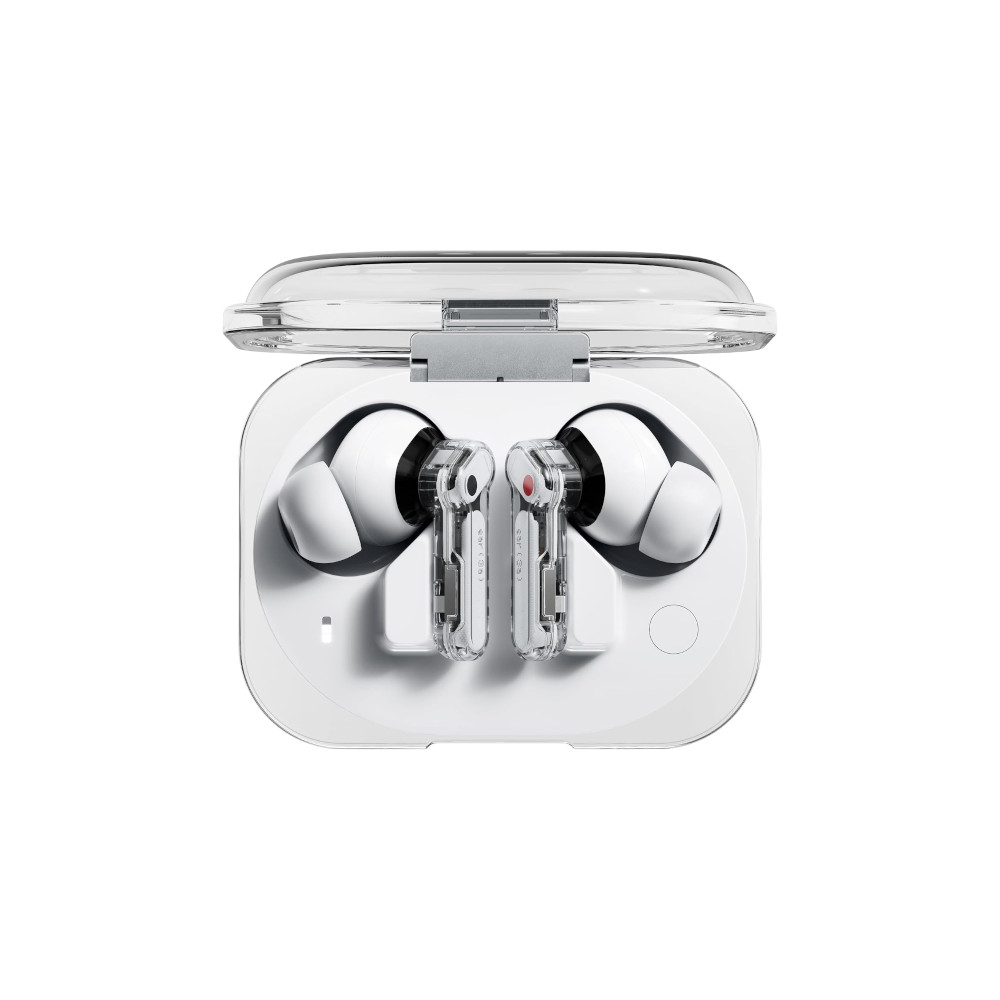
The Nothing Ear (3a), successor to the Nothing Ear (a), sports a 12mm driver, the latest Bluetooth stack, and comes in a number of eye-catching colors including: white, black, yellow, and now pink. The outer chassis uses the same clear plastic as several other Nothing products, allowing you to see a little bit of the innards of the earbuds. On the right earbud is a helpful red dot, while the left channel has a black one — similar RCA cables collecting dust behind your TV.
The earbuds themselves are based on a similar lollipop and stem design that you’re undoubtedly familiar with, and there aren’t many surprises when you first open the case. For example, the nozzles are short, and the four sizes of included sleeves snap onto said nozzle with only a minimal amount of force. At the end of the stem is a pressure-sensitive area that allows you to pinch as a means of issuing commands to your earbuds, and the angle of the driver housing also keeps the stem from getting too close to your skin. This is good, as some people are sensitive to nickel and acrylates, and this kind of design keeps the charging contacts from rubbing up against you.

Those who are particularly sweaty or like to exercise on occasion will be happy to note that the Nothing Ear (3a) has an IP54 rating, which means the earbuds themselves can handle light moisture. While we won’t say that these can handle a shower or anything, definitely don’t worry about taking the Nothing Ear (3a) for a workout or on a rainy commute.
Finally, the case of the Nothing Ear (3a) is a bit more rounded than before, though with an interesting lip protruding from the edges of the housing. On the left side of the case, there’s an indicator light that shows information about the earphones, such as charge level, pairing status, and so on. On the right is a pairing button. The earbuds cradle at an odd angle in the case, with the nozzles facing outward when everything’s secure. Definitely ensure that you’ve got the hang of placing the earbuds back in the case correctly, as you can sometimes have one bud or the other slightly askew, which can break the contacts and prevent charging.
Features
The Nothing Ear (3a), being a modern set of earbuds with Bluetooth 6.0, comes with a lot of standard features and functions that you should be able to find on any other flagship earbuds. In addition to the new features of Bluetooth 6.0 and LE Audio, you also get device location searching, though some of the more advanced goodies with the new standard aren’t as visible.
Feature-wise, the Nothing Ear (3a) doesn’t feel like a “more affordable” option in Nothing’s stable of earbuds, as it has a lot of extras and add-ons that definitely don’t scream “cheap.” For example, the earbuds support very uncommon user-centric features like call recording, (paid) transcriptions, Spatial audio, and more if you have a Nothing phone. In addition, using the earbuds in conjunction with the Nothing X app will also grant you an 8-band parametric EQ, and Audio Snapshots — a quick way to make a short clip of whatever you’re listening to by pinching both earbuds at the same time. This stores up to 32 MB of data on your earbuds for non-commercial use, which you can retrieve through the app later.

Of course, you will need a Nothing account in order to make use of some of these features — specifically the transcription and recording — so that’s something to be aware of if you’re not keen on a company having access to what you do with their products. That said, making a Nothing account is pretty straightforward, and will unlock the ability to hang in the company’s forums, and share your own parametric EQ presets as well. There’s a small collection of company-curated user presets for you to explore on the “Explore” tab of the equalizer, and you might find one there that you like better than the stock tuning. I’m a big fan of allowing users to share tuning adjustments, as it means any listener can draw upon the experience of others in the exact same boat as they are.
For those of you who prefer AI to the usual voice assistants, users of Nothing phones will be able to use voice-activated ChatGPT and Nothing’s Essential News AI briefings. Though you’ll need a subscription for the former, the latter is a Nothing feature that users won’t have to pay for beyond the phone.
How does the Nothing Ear (3a) connect?

The Nothing Ear (3a) connects via Bluetooth 6.0 with a claimed 15m range, and supports AAC, SBC, and LDAC codecs. It’s Hi-Res Audio certified, with LDAC enabling transmission at up to 24-bit/96kHz. All that alphabet soup and numbers to say: the Nothing Ear (3a) has the latest Bluetooth standard, and supports a range of codecs that shouldn’t leave you wanting better.
The Nothing Ear (3a) connects via Bluetooth 6.0 with a claimed 15m range, and supports AAC, SBC, and LDAC codecs.
Bluetooth Multipoint (dual-device connection) is supported across Android, Windows, and iOS, and there’s a low-latency/low-lag mode for gaming and video. However, the earbuds only support two simultaneous connections via the Nothing X app. You can toggle whether a phone call or music playing will force a switch between devices, or you could leave it alone.
Additionally, you may notice that even with the in-ear detect option turned off, the ANC sometimes drops out. This is because the sensor on the earbud is a little finicky, and when you don’t get a snug fit to your ear: sometimes the earbuds think they’re not in position. This only happened to me once, and readjusting my fit while using the app to confirm what was going on helped out immensely.
How long does the Nothing Ear (3a)’s battery last?

Testing the battery life of the Nothing Ear (3a) is challenging because the wear sensor — whatever they use for it — would not cooperate with our normal battery testing setup. Because it wouldn’t trigger, each of the four battery tests that we performed only tell us how well the earbuds handle music playback with the ANC off; unlike all of our other data. However, the funniest part of testing these proved that Nothing’s marketing claims weren’t guff: the Nothing Ear (3a) gave up the ghost around the 10 hour mark every single time — exactly what they claim when ANC is disabled. I’m going to try some more methods to defeat the wear sensor, but since Nothing’s estimation seems to be accurate, its estimate of 6 hours with ANC on doesn’t seem too unreasonable.
Nothing's battery life claims were right on the mark — literally.
Just like it is with most other wireless earbuds, the Nothing Ear (3a) has fairly small cells — 55mAh per earbud, and a 500mAh battery in the case — so you should take care not to run these things down to zero if you can avoid it. But that also means that charging is very quick. Nothing posits that you can get a full charge in the earbuds within 10 minutes. Though it took a little longer than that in my experience, earbuds in general charge very quickly because their batteries are tiny.
How well do the Nothing Ear (3a) cancel noise?
The Nothing Ear (3a) is able to cancel outside noise by an average of 80.9% in perceived loudness across all samples. Though this isn’t the world-beating ANC that some may want, it’s far more than enough to handle a normal commute. Really, the main deficiency here is a drop of efficacy in the highs, which could be solved by using aftermarket ear tips if you really don’t like that.
I found that the ANC of the Nothing Ear (3a) performed similarly to the Google Pixel Buds 2a, which also struggles with isolation in the highs. Unlike the Pixel Buds 2a, however, the Nothing Ear (3a) is more capable of hushing most common noises out there. Nothing notes that it’s added a new mesh to prevent wind noise, and it does seem to be at least as effective as other competing models. You can also reduce the strength of the ANC in the app by selecting one of the three modes if you find it objectionable.
How good is the Nothing Ear (3a) Transparency mode?
Nothing typically does a decent job with its transparency modes, and the same is true for the Nothing Ear (3a). In my time with the earbuds, I kept transparency mode on in the house and on walks with the dog so I could hear what was going on around me, and the earbuds did their job. It’s a little hard to place some sounds, but localization is pretty difficult for audio products to do on a good day, so I’m willing to cut the Nothing Ear (3a) some slack here. If you absolutely must have good localization of outside sounds, a set of open earbuds will typically be a better choice here.
How do the Nothing Ear (3a) sound?
Well, I hope you like bass. Because these earbuds bring the lows.
Reviewer’s notes
Editor’s note: this review uses a hover-enabled glossary to describe sound quality based on a consensus vocabulary. You can read about it here.
How would most people rate the sound from 1 to 5?
The chart below shows the Multi-Dimensional Audio Quality Scores (MDAQS) earned by the Nothing Ear (3a). The algorithm uses a mountain of data from real people to predict how a group of 200 or so humans would rate the sound of a product on a scale from 1.0 (very bad) to 5.0 (very good), and return a mean opinion score.
- Timbre (MOS-T) represents how faithfully the headphones reproduce the frequency spectrum and temporal resolution (timing information).
- Distortion (MOS-D) represents non-linearities and added noise: higher scores mean cleaner reproduction.
- Immersiveness (MOS-I) represents perceived source width and positioning: how well virtual sound sources are defined in three-dimensional space.
Most people will likely enjoy the sound of the Nothing Ear (3a), though simulated panel responses like the above only sometimes point to why. It seems as though the Nothing Ear (3a) pushes well-received bass emphasis to its absolute limits, as the best-scoring EQ presets are the “Balanced” and “More Treble” options. Both of these score above 4.6 overall on a five-point scale, meaning that our simulated panel of 200 or so people would rate these earbuds as sounding pretty good. There doesn’t seem to be any issues with distortion beyond the usual, and immersiveness seems to be pretty good — though this will vary from person to person.
If you were to limit the comparison devices to only headphones and earbuds, the scores plummet — but still land around four out of five (good). But doing so highlights the weakness of the earbuds pretty well: the timbre. The More Bass EQ and the Voice EQ presets score a 3 and 3.2 respectively (low end of “okay”) and the default Balanced EQ and More Treble settings land at 3.4 (dead middle of “okay”). Though I don’t always agree with the tougher version of the Multi-Dimensional Audio Quality Scores, here: I am in full agreement. Though most people will like the Nothing Ear (3a), the ones that don’t will object to the tuning more than anything else.
Can you use the Nothing Ear (3a) for phone calls?

With three MEMS microphones on each side, with heavy mesh preventing wind noise, the Nothing Ear (3a) is well-equipped to handle phone calls in adverse conditions. Nothing also noted that the earbuds use “Clear Voice Technology” which is a machine learning-guided DSP, trained on 28 million scenarios to help attack background noises. In our labs, the earbuds mostly delivered, though the results aren’t perfect.
Nothing Ear (3a) microphone demo (Ideal conditions):
How does the microphone sound to you?
Nothing Ear (3a) microphone demo (Office conditions):
Nothing Ear (3a) microphone demo (Street conditions):
Nothing Ear (3a) microphone demo (Windy conditions):
Nothing Ear (3a) microphone demo (Reverberant space):
Gotta say, that’s a lot better than most $99 earbuds can manage. I’m especially impressed by the wind noise sample, as that’s usually where earbuds fall flat. The Nothing Ear (3a) had some issues in dispelling echoes in a reverberant room, but other than that: gold star, Nothing.
What owners say
What verified owners say after living with them. Not part of the SoundGuys rating.
Own the Nothing Ear (3a)?
Tell other readers how they've held up. Your answers feed the owner summary, and a photo of your pair earns the photo-verified tag.
Should you buy the Nothing Ear (3a)?

For someone who likes to have the latest things but doesn’t want to break the bank, the Nothing Ear (3a) is a sensible buy — provided you’re willing to tinker with the app a little to get your preferred tuning. The sound out of the box is far too bassy, but can be rescued with minimal effort. The rest of the experience is pretty solid for a set of entry-level earbuds, and the frustrations are few and far between. The Nothing Ear (3a) is exactly what you should expect for spending $99, and that’s high praise coming from me. Though the Nothing Ear (3a) isn’t among the best noise canceling earbuds overall, they are pretty darn good for the price.
But the earbuds aren’t perfect, and if you’re looking for alternatives, consider the EarFun Air Pro 4 ($89.99 at Amazon), Sony WF-C710N ($119.99 at Amazon), or Anker Soundcore Liberty 5 ($129.99 at Amazon) if you want a direct competitor. If you like what you see, but you want a bit of a step up, the Nothing Ear (3) ($179 at Amazon) is still a solid buy — and it’s old enough that it may appear in sales.
Thank you for being part of our community. Read our Comment Policy before posting.