All products featured are independently chosen by us. However, SoundGuys may receive a commission on orders placed through its retail links. See our ethics statement.
Google Pixel Buds 2a vs Google Pixel Buds Pro 2: Which corners to cut?
Nov 25, 2025 — 6:30 AM ET
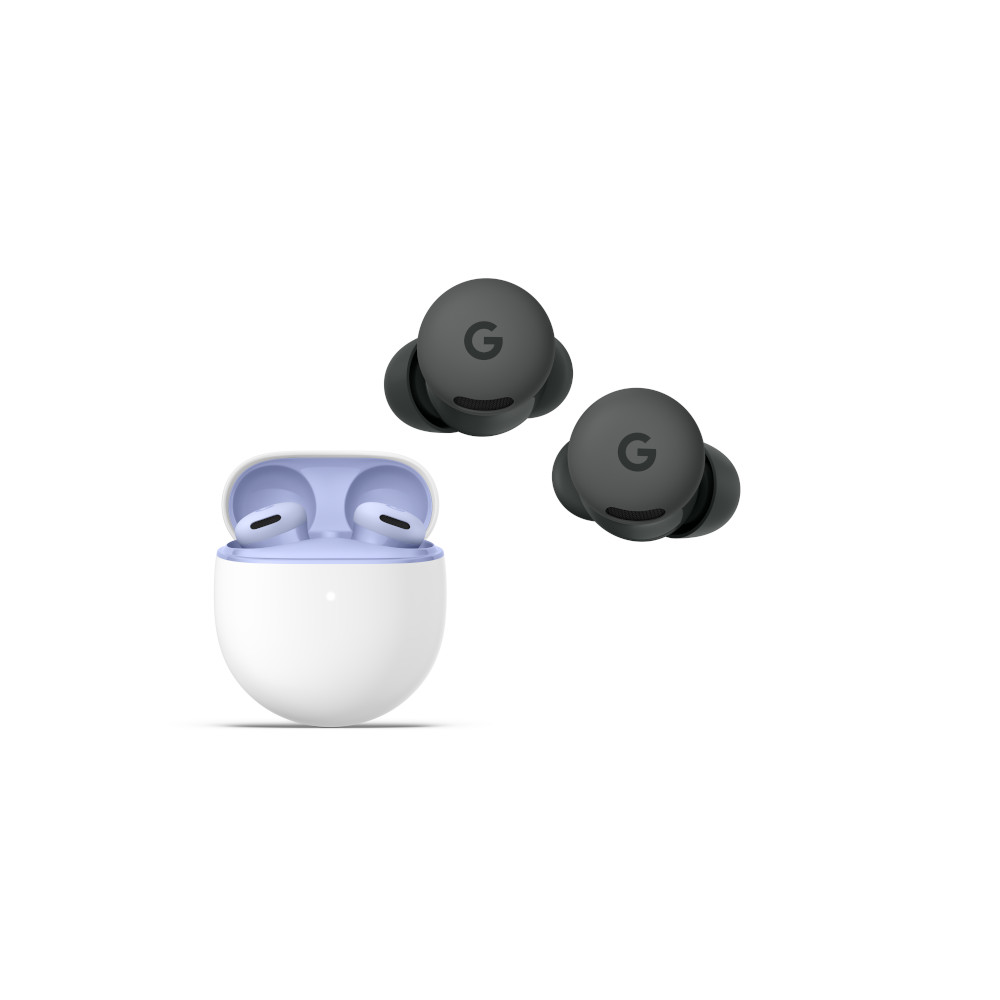


Google’s latest earbuds are certain to be making appearances on people’s wishlists this holiday season, but which product wins when you pit the Google Pixel Buds 2a vs Google Pixel Buds Pro 2? Let’s take a closer look at the blow-by-blow to see which is right for you.
This article was originally published on November 25, 2025, and this is the first version.
What’s it like to use the Google Pixel Buds 2a compared to the Google Pixel Buds Pro 2?

Both the Google Pixel Buds 2a and Google Pixel Buds Pro 2 are very similar, save for the finish of the former being glossy, and the finish of the latter being matte. Aside from that, the internals are virtually identical, and even the charging cases look the same.
Each set of earbuds have a soft, semi-nozzleless bud design with a semicircle-shaped stabilizer fin. Both products have capacitive touch surfaces on the backs of the earbuds to act as the controls, and both have a similar mass. You could very easily be forgiven for not knowing which earbuds are which if you’re not familiar with them intimately. Both are comfortable, and neither product builds heat all that badly.

If you’re a gym rat, each product is capable of resisting a fair amount of sweat, moisture, and dust — though you shouldn’t shower or swim with these products in your ears. The cases are only IPX4, which affords some protection against incidental moisture, but no rating for dust protection.
Do the Google Pixel Buds 2a or Google Pixel Buds Pro 2 have more features?

Interestingly enough, both the Google Pixel Buds 2a and Google Pixel Buds Pro 2 have a similar slate of features. However, something had to get the axe with the less-expensive version for the “higher-end” model to be worth it, so there’s a few things missing. For example, the Google Pixel Buds 2a has neither Adaptive Audio like the Google Pixel Buds Pro 2, nor wireless charging. Additionally, the cheaper buds also lose out on conversation detection, loud noise protection, and low-latency mode.
If you’re someone who really needs the tough controls, the Google Pixel Buds Pro 2 are the easy choice. Beyond the extra gestures and the features listed above, there’s not a ton that the Google Pixel Buds Pro 2 can do that the Google Pixel Buds 2a cannot.
How do the Google Pixel Buds 2a and Google Pixel Buds Pro 2 connect?

Both the Google Pixel Buds 2a and Google Pixel Buds Pro 2 connect to source devices exclusively via Bluetooth 5.4. Both sets of earbuds can use the SBC, AAC, and LC3 codecs, as well as Auracast. Both options also support Multipoint. There’s no real advantage to using one set of earbuds over the other as far as connectivity is concerned, though future firmware updates may change some features.
That said, many of the features that Google advertises like real-time translation and ultra-wideband microphones are tied to the Pixel ecosystem. So if you don’t have a Pixel phone, you will have to go without.
Is battery life better on the Google Pixel Buds 2a or Google Pixel Buds Pro 2?

Under the same conditions, the Google Pixel Buds 2a was able to run through our battery test for 6 hours and 46 minutes with the ANC on, and the Google Pixel Buds Pro 2 was able to endure for 7 hours and 55 minutes. Though this is a clear victory for the Google Pixel Buds Pro 2, it’s tough to imagine that anyone but frequent transcontinental travelers will notice. Though I suppose anyone trying to listen to their earbuds all day, every day will run into issues. If you’re hoping to keep your earbuds in operation for as long as possible, the better performance of the Google Pixel Buds Pro 2 means it’s more likely to stay out of the trash longer than the Google Pixel Buds 2a.
Do the Google Pixel Buds 2a or Google Pixel Buds Pro 2 block noise better?
Loading chart ...
Though similar in performance, the Google Pixel Buds Pro 2 edges out the Google Pixel Buds 2a in both isolation and active noise cancelation. However, both earbuds do have that odd dip from 4kHz to 8kHz that will allow some higher-pitched noises through. Still, the performance of the Google Pixel Buds Pro 2 seems to be far superior — though neither is truly bad here.
Do the Google Pixel Buds 2a sound better than the Google Pixel Buds Pro 2?
More people will like the sound of the Google Pixel Buds Pro 2 than the Google Pixel Buds 2a, but both have their own foibles and wrinkles. There’s no guarantee that you, personally, will prefer one over the other, but we can discuss the differences in detail.
Objective Measurements
Loading chart ...
You can see that the Google Pixel Buds 2a and Google Pixel Buds Pro 2 have somewhat similar highs, but the Google Pixel Buds 2a has a more pronounced bass region with less more mids than the Google Pixel Buds Pro 2. Because of this, you might find the sound to be slightly off of what you were hoping to hear, though the in-app equalizer can help this out a little bit. The Google Pixel Buds Pro 2, on the other hand, underemphasizes mids a bit, with an odd bump in 1.2-1.4kHz.
Higher than that, and both products play jump rope with our preference curve a bit. You’ll likely want to play around with the EQ presets a bit, as those change the sound pretty drastically for both.
Balanced EQ Preset
Loading chart ...
This preset touches down the bass and a bit of the highs to bring the response a bit “flatter,” though it still has the odd presentation in the highs.
Clarity EQ Preset
Loading chart ...
This response flattens out the bass shelf while bumping up the spike above 10kHz. Presumably, this is to boost the illusion of “detail” by highlighting little sounds that often get drowned out in an otherwise more-standard tuning.
Heavy Bass EQ Preset
Loading chart ...
This preset drops highs by about 1-2dB, while boosting the bass shelf by about 4dB over the default response. This definitely offers users exactly what’s on the label.
Light Bass EQ Preset
Loading chart ...
Like other presets, this one flattens out the bass shelf, but it also increases highs by about 1dB to make the earbuds sound fairly bright.
Vocal Boost EQ Preset
Loading chart ...
For podcast and other vocal content, this preset dampens bass considerably, while also cutting highs by about 1-3dB so that other sounds don’t dominate your experience while trying to focus on voices. It would be much easier if the underemphasis between 1 and 4kHz was addressed, but that wasn’t in the cards, apparently.
Clarity EQ Preset
Loading chart ...
This preset brings down the bass (you’ll see this a lot), and boosts the highest octave a bit.
Vocal Boost EQ Preset
Loading chart ...
If you want to hear vocals more than music, this preset touches down everything outside the traditional vocal bands, with a peak centering on 1kHz.
Balanced EQ Preset
Loading chart ...
This preset flattens out the bass shelf, and touches down some of the overemphasis in the highs.
Light Bass EQ Preset
Loading chart ...
For those of you who don’t like a bass bump at all, the Light Bass EQ preset flattens it out considerably.
Heavy Bass EQ Preset
Loading chart ...
This preset bumps bass up by quite a lot, though we didn’t really hear many issues with this in other areas. This shouldn’t impact distortion much. Those missing more bass will likely park their earbuds on this preset, and not change the settings.
How would most people rate the sound (1-5)?
- Timbre (MOS-T) represents how faithfully the headphones reproduce the frequency spectrum and temporal resolution (timing information).
- Distortion (MOS-D) represents non-linearities and added noise: higher scores mean cleaner reproduction.
- Immersiveness (MOS-I) represents perceived source width and positioning: how well virtual sound sources are defined in three-dimensional space.
When put to a virtual panel of 200+ listeners, more people will like the sound of the Google Pixel Buds Pro 2 than the sound of the Google Pixel Buds 2a. However, it should be noted that the tuning for both is a little on the weak side, despite the other metrics doing so well. You shouldn’t hate either earbuds, but most people won’t think too much about the sound quality when given these buds.
Do the Google Pixel Buds 2a or Google Pixel Buds Pro 2 have a better microphone?
As both products are meant to be your everyday ear-candy buddies, they also have microphone arrays to handle calls and video chats. Below are some recordings we made in controlled conditions so you can compare the performance of each without having to take our word for it.
Google Pixel Buds 2a microphone demo (Ideal conditions):
Google Pixel Buds Pro 2 microphone demo (Ideal conditions):
Google Pixel Buds 2a microphone demo (Windy conditions):
Google Pixel Buds Pro 2 microphone demo (Windy conditions):
Which samples sound better to you?
Google Pixel Buds 2a vs Google Pixel Buds Pro 2: Price and availability
Perhaps the one big draw the Google Pixel Buds 2a has over the Google Pixel Buds Pro 2 is the price. Available at most online retailers for $129, the Google Pixel Buds 2a is a full $100 less expensive than the Google Pixel Buds Pro 2 at full price. However, since the Google Pixel Buds Pro 2 is so old now, you’re not likely to end up paying the full $229.

As both of these products are by a rather large tech company, you should have no difficulty finding either the Google Pixel Buds 2a or Google Pixel Buds Pro 2 online or in brick-and-mortar stores. Additionally, you may find one or both in airport vending machines, as that’s a thing now.
Should you get the Google Pixel Buds 2a or Google Pixel Buds Pro 2?
Though neither pick is bad here, it wouldn’t surprise us if more people chose the Google Pixel Buds 2a simply for cost. A $100 discount is a pretty sizable discount for earbuds that are only slightly poorer in features and a bit worse in ANC performance. That said, those who desperately need ANC performance are likely going to grab the Google Pixel Buds Pro 2 and not think twice.
ANC and transparency
Affordable price
Bluetooth Multipoint and Audio Switch
Improved size and shape
Tuned performance
To that end, we’d boil down the decision to these finer points:
Get the Google Pixel Buds 2a if you:
- You own a Pixel phone.
- Are looking to save money more than get top-flight features.
- You like a glossy finish more than matte.
- ANC is not a top concern for you.
Get the Google Pixel Buds Pro 2 if:
- You own a Pixel phone.
- You need very effective ANC.
- You listen to your earbuds for over 4 hours at a time.
- You have the spare cash.
Which product suits you better?
Thank you for being part of our community. Read our Comment Policy before posting.