All products featured are independently chosen by us. However, SoundGuys may receive a commission on orders placed through its retail links. See our ethics statement.
No, you don't need 32-bit float recording, and I'll tell you why
Jun 17, 2026 — 6:00 AM ET


32-bit float recording has blown up on social media, to the point where it’s treated as a must-have on every new wireless mic. Does missing it actually matter? Not really. It’s a nice feature to have, but it won’t make or break your recordings. So why is the industry moving to 32-bit float, and are you being left behind without it?
Why are we moving to 32-bit float?

24-bit is still the standard, and it’s what you hear when you stream music. Even Spotify’s lossless files delivers tracks at 24-bit/44.1kHz. Higher-end services like Apple Music and Tidal go further, but they still cap out at 24-bit/192kHz. If everything we listen to is 24-bit, it’s worth asking why anyone needs to record in 32-bit float at all.
The answer is that 32-bit float lives at a stage most listeners never hear: recording and editing, in studios and home setups. Its real advantage is enormous dynamic range, enough to capture the loudest sound on earth and still leave headroom. For context, the 1883 eruption of Krakatoa is one of the loudest events ever estimated, at somewhere around 310dB, while a loud concert tops out closer to 120–130dB. But recording ear-splitting volcanoes isn’t the point.
The point is convenience and safety. If you’re recording in a hectic environment, or your recorder is mounted somewhere you can’t easily watch the levels, 32-bit float is a lifesaver. You don’t have to nail your levels on the spot; you can fix them later in post. That’s a big advantage over 24-bit, which has long come with a few headaches you have to work around.
What’s wrong with 24-bit recordings?

The biggest problem with 24-bit recording is clipping, and it trips up beginners constantly. Push the level too high to capture every detail, and a sudden spike can overwhelm the analog-to-digital conversion and distort. Set it too low to play it safe, and you’re left with an audible noise floor once you raise the volume afterward. Before 32-bit float, you had to manage that balance yourself.
Plenty of workarounds exist. Originally, you simply adjusted the gain on your interface in real time. As the tech improved, we got automatic gain control and audio compressors. Auto gain raises the level when a source gets too quiet, and a compressor reins it in when it gets too loud. There are also “safety tracks,” which record a second, quieter version of the audio on a separate channel as a backup. Some interfaces even use hardware tricks to squeeze more dynamic range out of a 24-bit recording.
Even so, problems creep back in during editing. Boost a quiet recording, and you boost its background noise along with it, because 24-bit has a higher noise floor than 32-bit float. Lean too hard on a compressor and you can flatten the natural rise and fall of a person’s voice. These are exactly the problems 32-bit float was built to solve.
Does 32-bit float matter to you when buying a mic or recorder?
How do 32-bit float recordings fix the issues?

Making a 32-bit float recording takes at least two analog-to-digital converters (ADCs) running at different levels. One optimized for quiet sounds, one for loud. It works a lot like a safety track, except instead of putting the two versions on separate channels, a single 32-bit float file holds both. Some hardware uses as many as five ADCs to pull this off. More isn’t automatically better, though, and it won’t solve every problem.
In the recording itself, there’s effectively no chance of clipping, but that doesn’t mean a 32-bit float file can never contain clipping. Most professional mics handle very loud sounds, yet some sources are simply too loud for the microphone to capture cleanly. When the mic itself clips, that distortion gets baked into the 32-bit float file, and no amount of editing brings it back.
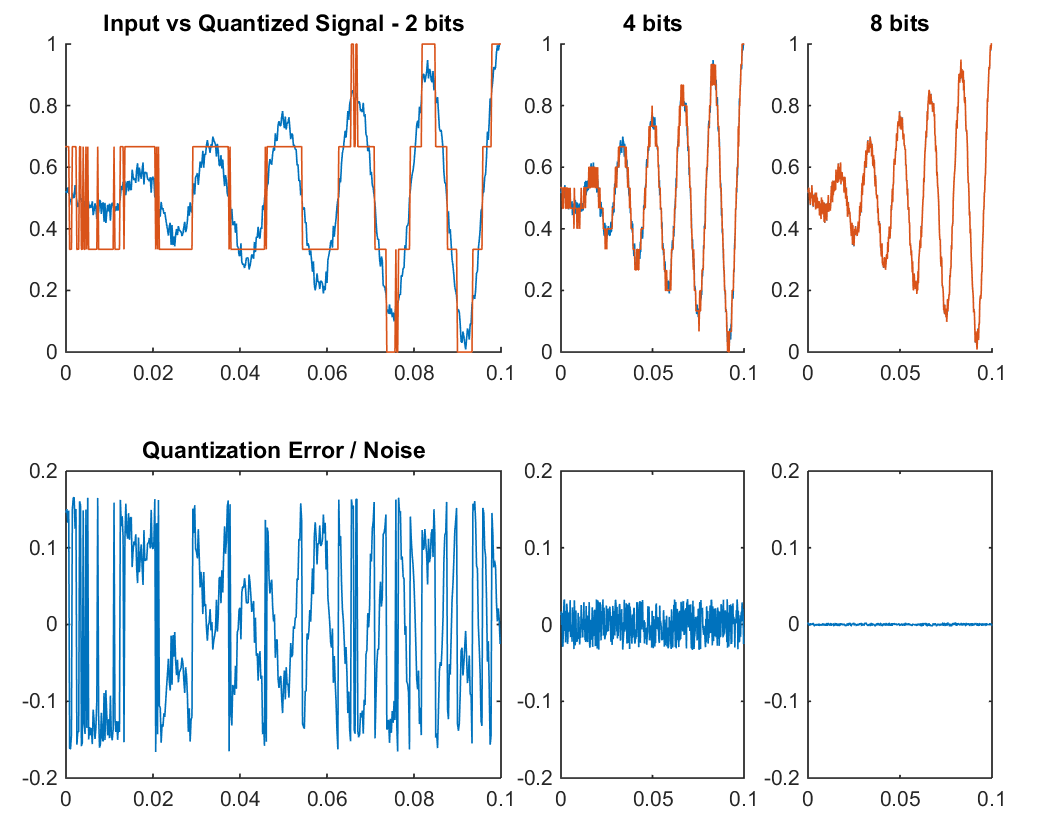
That wider dynamic range still won’t save a noisy recording. If you know you’ll be making heavy edits, it helps to bump up the sample rate too, since the extra detail gives some noise-reduction tools more to work with. Most 32-bit float recordings still run at 48kHz. The same sample rate as their 16-bit and 24-bit counterparts.
When you’re critically listening, 32-bit float doesn’t sound any more detailed than 24-bit. Most people can’t hear a difference once a recording passes CD quality, which is 16-bit/44.1kHz. Even a Hi-Res service like Qobuz doesn’t stream 32-bit float; it tops out at 24-bit/192kHz FLAC. The format’s job is recording and editing, not playback.
To actually record in 32-bit float, you need hardware that can output it, your recording device only ever captures the highest-resolution version your interface can send it. That means the feature shows up mostly in field recorders and wireless lavalier kits rather than standard interfaces.

There still isn’t much pro gear that outputs 32-bit float, but Zoom has been leaning into it across its audio interfaces. Even Razer launched a USB-C microphone that records in 32-bit float. Cameras are getting on board too: the Nikon ZR is the first interchangeable-lens camera to record 32-bit float audio internally, without needing an external module bolted on.
You shouldn’t worry about missing 32-bit float
So no, you don’t need 32-bit float recording, but it’s a welcome convenience if you have it. Don’t feel like you’re being left behind without it. Even working studios still rely on the same technology home studios use: auto gain, clip guard, and setting proper levels (gain staging) to capture the audio you hear every day. The best way to get better recordings isn’t a spec on a box. It’s learning to pick the right microphone for your environment, using good mic technique, and getting your gain staging right.
Thank you for being part of our community. Read our Comment Policy before posting.