All products featured are independently chosen by us. However, SoundGuys may receive a commission on orders placed through its retail links. See our ethics statement.
Surfans F20 Pro+ review: A modern MP3 player without the hassles of old
Oct 20, 2026 — 1:57 PM ET


Music players used to mean finding CDs, ripping the songs, and uploading them to your MP3 player. With the Surfans F20 Pro+, you don’t have to go through that hassle. You get the modern convenience of streaming services such as Spotify and Apple Music. You also get a touchscreen while still keeping classic button controls. I tested it out to see if the old-school design makes it easier to listen to music on the go without my smartphone.
What I like about the Surfans F20 Pro+

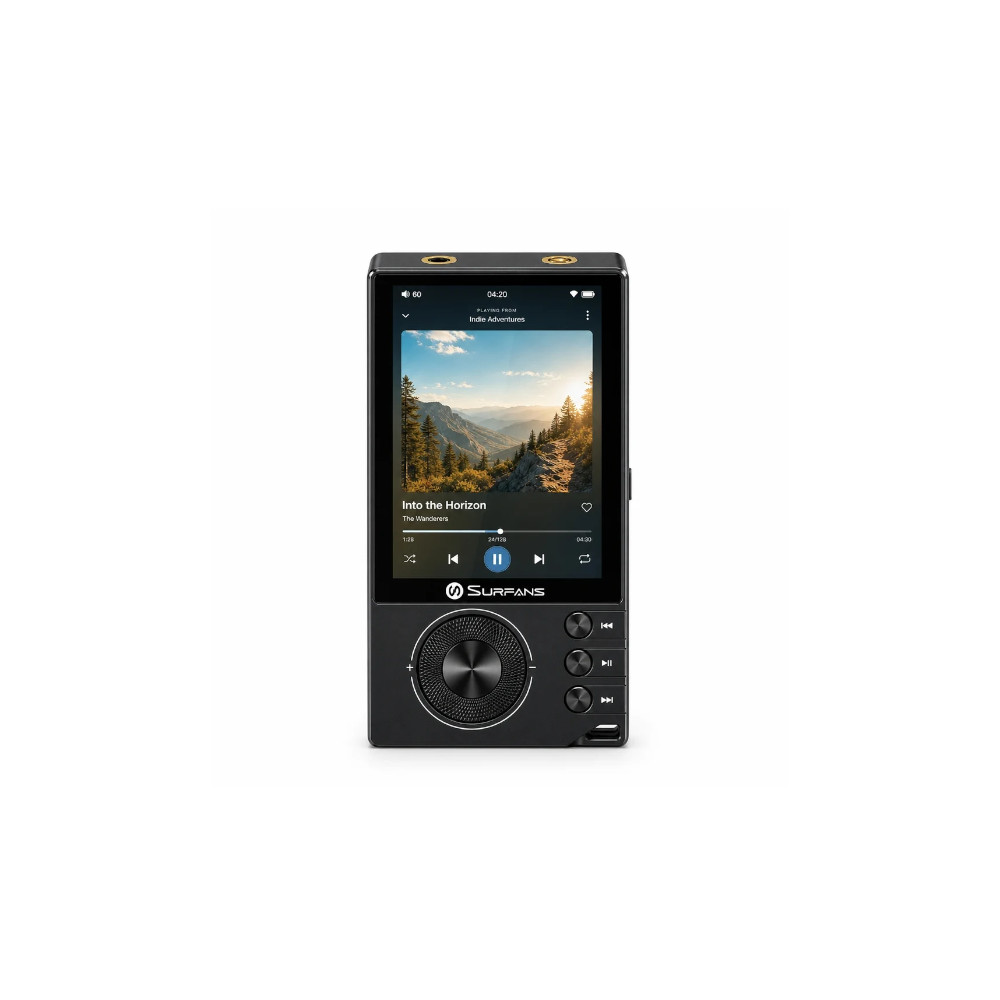
The Surfans F20 Pro+ feels solid in the hand. Despite that, it’s not heavy by any means, and fits in the palm of my hand neatly. I also like the lanyard loop in the corner. I’m glad I’m starting to see lanyards make a little comeback outside of conventions. It can add personal flair or even work as a safety strap. There’s also expandable storage via a microSD card, so you can easily bring over your old music library. The microSD card slot supports cards up to 1TB, so you can expand the storage as needed to fit your entire music library.
The user experience on the Surfans F20 Pro+ feels smooth. The front dial scrolls smoothly, and the playback controls have a nice tactile feel. As for the Android 12 interface, no striking problems there. I use Apple Music and can go through my playlist and feeds just fine. I thought I would have a difficult time navigating it, but even with the tiny screen, I was able to get where I needed to. After logging in to apps like Spotify, you can change the data rate to lossless to get the most out of the Dual ESS9018K2M DAC in the Surfans F20 Pro+.

With Wi-Fi and Google Play support, you can still access your favorite apps from the F20 Pro+, with Spotify and Tidal pre-installed. If you prefer Qobuz or other streaming apps, you can quickly download them from the Google Play Store. Installing apps is as easy as logging in and installing the app. The Surfans F20 Pro+ is made for those who are between streaming services and amassing a collection of personal audio files.
In terms of sound quality, the Surfans F20 Pro+ isn’t that different from a premium desktop DAC. The specs here are more than good enough to pass most listening tests, and your music should sound as you expect. On streaming services like Spotify, I noticed minimal difference when comparing it directly to my regular desktop DAC.
The DAP has two wired outputs: 3.5mm and 4.4 mm balanced connections. I can drive harder-to-drive, more power-hungry headphones with the 4.4mm jack, which provides up to 500mW at 32 ohms. The dual ESS9018K2M DAC Chip + Dual OPA1612 Operational Amplifiers can deliver audio formats such as DSD 512 and 192kHz/24bit.
The Surfans F20 Pro+ also has Bluetooth with LDAC support, so you can listen wirelessly in higher fidelity than the standard SBC and AAC codecs.
What I don’t like about the Surfans F20 Pro+
While I’m glad that the Surfans F20 Pro+ comes with a case, it slightly cheapens the device’s feel. With the unit we received, the case didn’t quite fit the device. The front was bowed outwards, and the cutout for the volume wheel isn’t centered. The case also makes the playback controls feel a bit mushier than I’d like. Aside from the case, there isn’t much to pick on in the unit’s build.

By default, the F20 Pro+ will automatically shut off after 15 minutes to save battery life. This wouldn’t be much of an issue if the start-up time were short, but I found it takes 34 seconds to start up the device and get into the menus, along with holding the power button for 5 seconds to power the device on. Surfans claims that the F20 Pro+ has a battery life of 10 hours, and it roughly matches my experience with it. So there’s not much reason to have such aggressive battery-saving modes out of the box.
While the in-app experience itself is smooth, the menu interface feels a bit clunky. Swiping up into the app selection is a bit jarring, and I found the menu occasionally stutter as I scroll through the apps. Fortunately, it’s only in the main menu, and the apps themselves run smoothly.
Should you buy the Surfans F20 Pro+?

For $150, the Surfans F20 Pro+ builds on the music players of old. You get a modern user interface and conveniences such as a touchscreen and streaming integration. For those looking to leave your smartphone at home while carrying your Spotify library, you might consider the F20 Pro+. It delivers excellent sound quality and has enough features to function as a daily driver for music playback.

Thank you for being part of our community. Read our Comment Policy before posting.