All products featured are independently chosen by us. However, SoundGuys may receive a commission on orders placed through its retail links. See our ethics statement.


I'm convinced the Akai MPK Mini IV is the best midi keyboard for most people
Mar 12, 2026 — 7:02 AM ET
Akai MPK Mini IV


The Akai MPK Mini series has been a gateway into music production for more than a decade. This is the most popular line of MIDI keyboards in the world, and for good reason. These keyboards typically strike the right balance between portability and affordability, as we pointed out in our Akai MPK Mini MK3 review. The Akai MPK Mini IV continues that tradition. It doesn’t reinvent the compact MIDI keyboard category, but it fixes several long-standing complaints about earlier models. After spending time producing a few tracks using the MPK Mini IV, I can see why this controller remains one of the most common recommendations for new musicians and producers looking to take their creativity on the road. Let me explain why.
This article was published on March 12, 2026, and this is the first version of the article. Updates will follow as the market changes.
What I like about the Akai MPK Mini IV
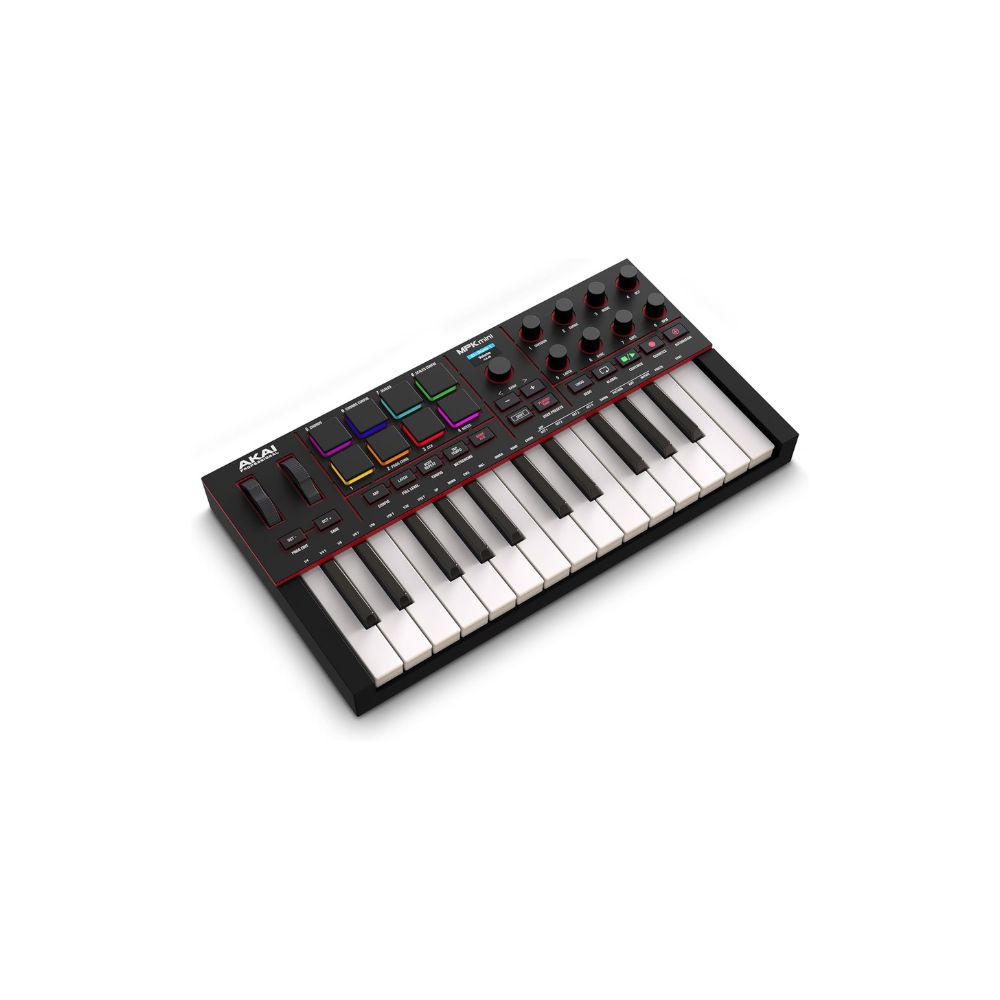
The first upgrade you’ll notice compared to earlier models is the switch from a joystick to separate pitch and modulation wheels. On older MPK Mini controllers, pitch bending often felt a bit awkward. The new wheels behave much more like those on a traditional synthesizer. The pitch wheel automatically returns to center, while the modulation wheel stays in place for effects like vibrato or filter sweeps. This change alone makes the controller feel much more expressive while playing.
The best part of the MPK series has always been the MPC-style drum pads, and the fourth generation keeps that legacy intact. In my testing, the pads feel extremely responsive. They react well to both velocity and pressure, which makes it easy to program expressive drum patterns. Even light taps trigger samples accurately, allowing for subtle ghost notes in hip-hop or electronic beats. You can also view the velocity in real-time on the controller’s display. If your workflow revolves around finger drumming, these pads are the best you’ll find on a controller this size.

One reason the MPK Mini remains so popular is its ability to help beginners start making music quickly. The controller includes several built-in creative tools to help you create music even if you don’t know much about music theory. Scale Mode locks the keyboard to a specific musical scale, Chord Mode triggers full chords with a single key, and the Arpeggiator generates rhythmic note patterns. The upgraded arpeggiator includes features like Freeze and Mutate, which can generate evolving patterns automatically. While experimenting with these tools, I found myself quickly sketching out ideas for new tracks. For beginners who aren’t comfortable with music theory yet, these modes remove a lot of friction from the creative process.
The Akai MPK Mini IV also comes bundled with a solid collection of software designed to get beginners started. The software bundle includes:
- Ableton Live Lite 12
- Studio Instrument Collection with hundreds of sounds
- 30-day trial to Melodics lessons for learning pads and keys
- Two months of Splice access to download samples
This bundle effectively turns the controller into a complete starter studio. Even if you’ve never produced music before, you get everything you need with the included software to start making any genre of music. I was really impressed by the sounds in the Studio Instrument Collection. The interface in the Studio Instrument Collection is also very easy to navigate, which makes it much more approachable for beginner musicians than complicated synth plugins.

While the Akai MPK Mini IV is a great option for beginners, it also has features that experienced studio professionals can appreciate, such as the addition of 5-pin MIDI Out. Earlier MPK Mini models worked mainly as controllers for computer software. With MIDI Out, the MPK Mini IV can now control external hardware synthesizers or drum machines, which makes it more useful in hybrid studio setups.
What I don’t like about the Akai MPK Mini IV
As expected, the MPK Mini IV uses mini keys instead of full-size keys. They work fine for programming basslines, melodies, or chords, but they aren’t ideal for playing piano parts. If you’re a trained keyboardist, you may find the keys too small for comfortable performance. Producers who want a more piano-like experience may prefer a larger controller that has full-size keys and more than two octaves to play on.
The MPK Mini IV includes eight rotary knobs, but there are no faders. For producers who like adjusting multiple parameters simultaneously—like mixing channel volumes—faders can be very useful. Their absence isn’t surprising on such a compact controller, but it may limit workflow for some users.

While the controller itself is plug-and-play, installing the full software bundle takes some effort. You’ll need to register the product, install Akai’s software manager, install a firmware update, and download several programs before everything works properly. Once the setup process is complete, the workflow becomes much smoother—but the first hour could feel slightly overwhelming for total beginners.
Should you buy the Akai MPK Mini IV?
For beginners and those looking for a portable production setup, the Akai MPK Mini IV remains one of the best MIDI controllers available. It combines portable hardware, responsive pads, creative composition tools, and a solid software bundle into a package that costs around $99. The improvements make this version easier to recommend than previous models. Even if you’re just starting your music production journey, the MPK Mini IV provides everything you need to begin making songs quickly.
Akai MPK Mini IV review: FAQs
No. The controller sends MIDI data and relies on music software or external instruments to generate sound.
Yes, the Akai MPK Mini IV has native support for Ableton Live, FL Studio, Logic Pro, Cubase, and Bitwig Studio. You can also map the MIDI controls to any software of your choosing that supports MIDI input.
No. The controller does not include an audio output. You must connect headphones to your computer or audio interface.
Yes. The addition of 5-pin MIDI Out allows the controller to connect directly to external synthesizers and other MIDI hardware.
Thank you for being part of our community. Read our Comment Policy before posting.